
Yes I know you have been using formulas in Excel for decades. But just trust me… there is more. Here are some small but nice things you should know when it comes to editing a formula in Excel
Keep looking at the status bar
It shows you the current mode. First time you add a formula, it is in ENTER mode… next time you try to change it, the mode changes to EDIT.
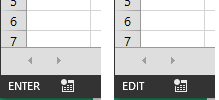
So what difference? In ENTER mode, moving the arrow keys selects cells outside the current cell. This way you can select the range for formula parameters.
In Edit mode, moving the arrow keys (right and left), moves the cursor WITHIN the formula cell – which helps you in editing the formula itself.
In some cases, you may want to change the mode. To do that press 
This is also very useful when you edit formulas in odd places – like Conditional Formatting formulas, Data validation formulas and so on… In these places, the default mode is Enter. You want to change something in the formula so you press arrow keys but it selects cells and disturbs the existing formula – which is very frustrating. In such cases, just press ![SNAGHTML175594c1[5]](http://efficiency365.com/wp-content/uploads/2014/01/snaghtml175594c15.png "SNAGHTML175594c1[5]") before editing and make sure that you are in EDIT mode before editing.
before editing and make sure that you are in EDIT mode before editing.
Syntax tooltip – why bold formatting?
All of us know that the formula syntax is shown whenever you are editing a function. But wait. Have you noticed some additional things there? Some of the parameters are in BOLD font. Do you know why?

Because your cursor is currently in that position. This is very useful in editing complex, nested formulas. It is sort of “situational awareness” while editing formulas.
Syntax tooltip – why Hyperlinks?
I am sure you have noticed it…

What is the use? Well, it helps you select the entire parameter by clicking the link 

This can be very useful in selecting a particular parameter in complex, nested formulas…
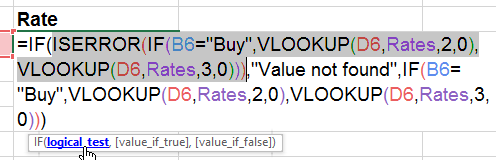
Imagine doing this manually 
Whatever is selected can be calculated with 

If you select part of the formula and press ![SNAGHTML17672b22[5]](http://efficiency365.com/wp-content/uploads/2014/01/snaghtml17672b225.png "SNAGHTML17672b22[5]") , it calculates it and shows the results.
, it calculates it and shows the results.
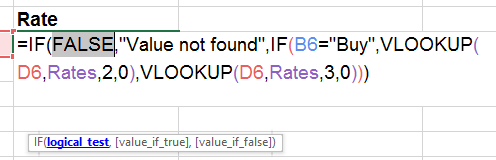
This is very useful for troubleshooting and quickly knowing the results of part of the formula.
REMEMBER NOT TO PRESS ENTER HERE. Else your formula will be overwritten with the result!
There is much more. But enough for one article already …



One Response
Reblogged this on Sutoprise Avenue, A SutoCom Source.