
Length of mail trails is proportional to your seniority (usually)! People just keep discussing, debating, arguing – with no end in sight. Never ending story. Sometimes, mail is NOT the best option to come to a consensus or resolve an issue. We need everyone to be present at the same time and focus on the problem at hand. Yes I know – all these people are in different continents or castles (!) – no problem. There is an elegant solution available …
Still there is a way to get them at least mentally in the same place – that is called a Lync (now Skype for Business) chat. How do you do that? Very simple. You will curse yourself for not knowing this earlier – try it out.
Open that long mail trail – open the IM dropdown and
select Reply ALL with IM. You just turned the office politics upside down!
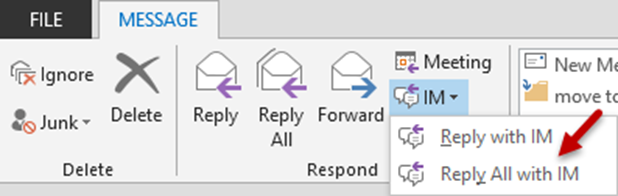
Suddenly, Outlook will talk to Lync and create a new chat (something like MEET RIGHT NOW) and add everyone who is available to that chat window.
Now you take the lead and at least attempt to resolve the issue / dispute / confusion / ambiguity at hand. Those who were dilly-dallying and hiding behind the sluggishness of email as a technology will have to answer immediately. Is that not nice?
It may not always work – but at least you have a choice – and you know about it!
I don’t blame you if you had not noticed this feature (it is there for 7 years now). Why? Because nobody drops those drop downs (Really – nobody does – we don’t have time).
But now that you found such a gem hidden under a dropdown, why don’t you drop every dropdown you come across and become an efficiency miner? Just a thought!
Would you like to share this knowledge with your colleagues or keep it to yourself? Knowledge is supposed to be POWER  – think about it…
***


