
Here is something I learnt yesterday at Wellington. I was conducting a session on Outlook for a team of EA and PAs for Government of NZ. I showed them the Outlook calendar can be managed at different levels of detail starting from 1 hour down to 5 minutes. Just right click on the time display in the daily or weekly view to change the setting.
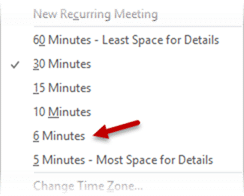
You will notice that there is a 6 minute option available there. Like most of us, I had never understood why would anyone want a 6 minute time slot. But then one of the participants enlightened me! Legal professionals always manage billing in 6 minute increments so that they can have 10 convenient slots per hour. I learnt something new.
This happens all the time. The more you teach, more you will learn!
If you think that a particular feature is useless – think again. This incident teaches you that every feature is designed with a purpose in mind. Discovering that purpose is called learning.
Want to learn more about effective email and time management? Check out my Outlook Knowledge Pack (50+ articles).


