
Contents
Lifelog
Conrad Bangkok.. Extended exposure photo…

The need
I needed this myself. I am new to the WordPress platform.
I wanted to add a page containing all my post titles for a simple reason. I don’t want to repeat the same post. Trust me it can happen!
So I did lot of R&D and finally found this simple method. No programming is necessary.
As a result I added the All Posts page to this blog.
The solution: WordPress archives Shortcode
- Go to WordPress admin page
- Go to Pages and Add New Page
- In the visual editor (no need to go to the text editor) type
[ archives order=asc]
- Save and publish the page

- That’s it. The page now lists all the posts in ascending order (oldest first)

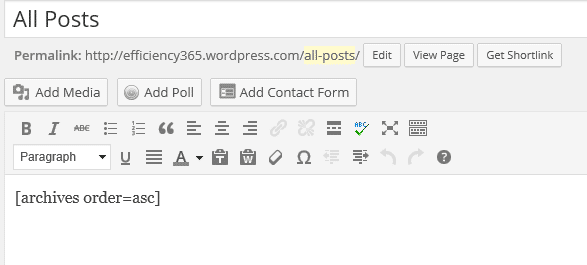
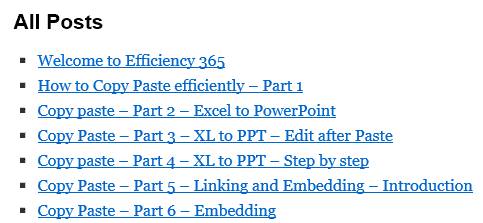
There are many other options available for refining the archive list. These modifiers are documented at Archives Shortcodes.
Problem
I wanted a serial number before each post. There is a before and after tag. But it did not work as the already has a
- tag around it. So OL and LI was ignored.
Better method
Then I found a better shortcode called [ display-posts]
This one gives much more customization options.
The final shortcode gave me exactlly what I wanted.
[ display-posts wrapper=”ol” order=asc display-posts posts_per_page=”500″ include_date=”true” date_format=” : j M y” ]
Here is the final result – All Posts Page



