Download System Reports Automatically – Power Automate – Part 1
Stop repetitive work. Save time. Automate downloading of system reports. Use Power Automate Desktop. Work with any app. Contents The need – 00:00 The process – 00:09 Create new flow

Stop repetitive work. Save time. Automate downloading of system reports. Use Power Automate Desktop. Work with any app. Contents The need – 00:00 The process – 00:09 Create new flow

Stop searching for common folders everyday. Add to Quick Access (now called Home). Contents Related videos Arrange windows instantly | Multitasking in Windows 11 | Snap Windows How to free

This is the continuation of the earlier video Text to word list and search. Earlier we started with a list of text and identified individual word and their frequency of

Find files by type, shared by or with me, related to meetings, sent by person or any file anywhere… all using OneDrive and Microsoft 365. Contents Related videos Search everything

Split data in a column into individual words, remove duplicates, remove unwanted characters and count the occurrences of each word. All using the Excel 365 new functions like Reduce, Lambda,
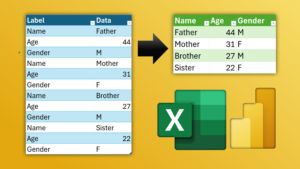
Pivot data using Power Query and Convert flat data with key – value pairs to tabular data. Simplify analysis. Use Power Query – Pivot Column for conversion. Download Sample File

Apply Excel chart templates and customize a chart once. Save as template. Apply it manually or automatically – using a macro. Download macro file from here (zip) Contents Related videos

No extensions. Use Microsoft Edge Browser Right click and choose Screenshot – Capture Full Page Also learn how to show long images using PowerPoint Morph. Bonus: Scrolling screenshot is also

These built-in add-ins are powerful and useful. Power Pivot, Power Maps, and Inquire. Learn how to enable and use them. Contents Related videos Handle millions of rows in Excel –

