
How to prevent Reply All when you are on BCC (stupid mistake)

I am sure this has happened to you before. You were on BCC, you did not realize it and did a REPLY ALL. That exposes you and the sender Just kiddingSick smile.

Well, if you use Outlook 2010 and Exchange server 2010 (or above), it is a simple matter of LOOKING at what Outlook is telling you. Outlook detects this problem AUTOMATICALLY and shows you a warning in RED color – just above the TO box. Notice it and act on it. Cancel the mail and just use REPLY – so that only the sender gets the mail.
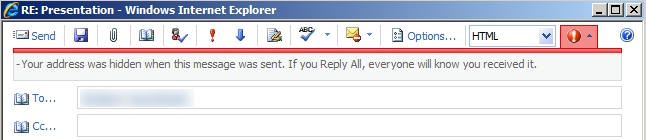
BCC feature in Office 2010

If you don’t know which version of Exchange Server you are using, talk to your IT team.

Queries | Comments | Suggestions | Wish list

Subscribe to Blog

Join 1,750 other subscribers

Popular articles

Use the power of Free Microsoft 365 Copilot to work more efficiently and grow faster in your career.

Excel to Power BI Course

Learn Power BI using the concepts you already know in Excel. Fast transition, in-depth coverage and immediately usable.

Pivot Table Pro Course

Yes. You use Pivot Tables everyday. Now it is time to find out the real power and nuances. 5.5 hours video, exercises, samples, Q&A.
